TABLE OF CONTENTS
Understanding Leads in AE Sync
What Are Leads in AE Sync?
Leads in AE Sync represent potential clients who have requested your High Value Offer (book/whitepaper offer from Media) or a Visit Appointment. These are used to track where a contact is within your workflow—from first contact to final conversion.
Each lead is always associated with a contact and is organized inside a pipeline made up of different stages.
Why Leads Matter
Leads Section helps you:
Track potential customers in one central place
Visualize where each contact is in your process
Identify bottlenecks or stalled conversations
Pipelines and Lead Stages
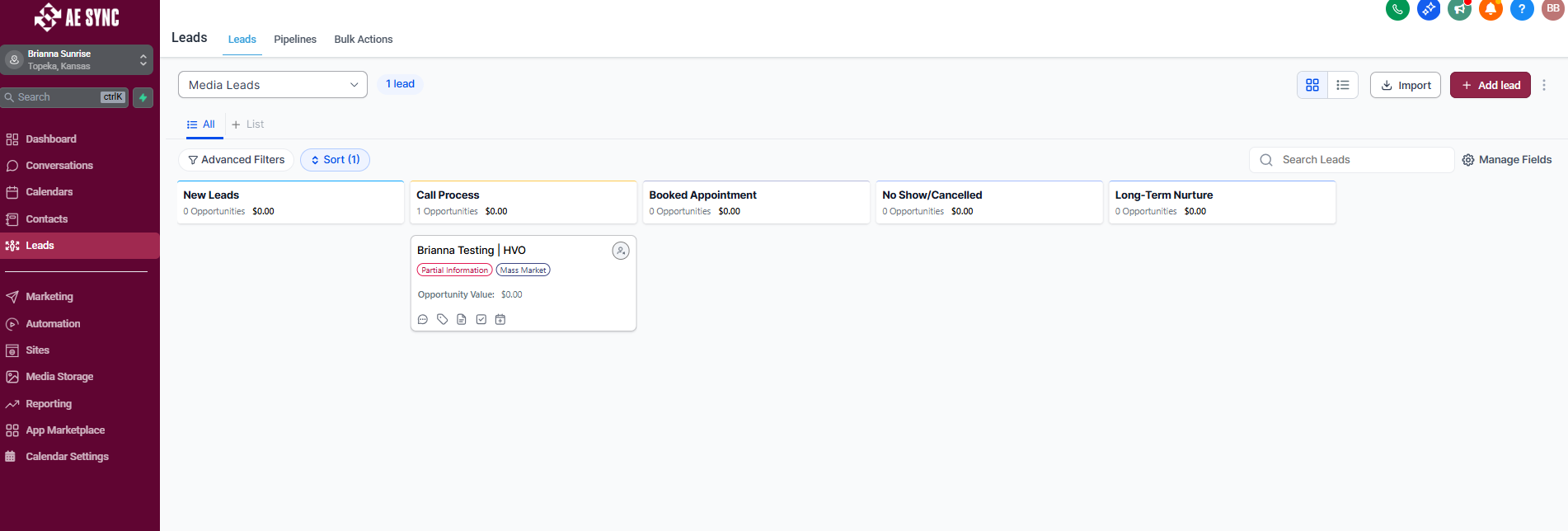
A pipeline is a visual workflow that shows the journey a lead takes. Each pipeline contains stages that represent steps in your process.
Example Media Leads Pipeline Stages:
New Lead
Call Process
Booked Appointment
No Show/Cancelled
Long-Term Nurture
Leads move from stage to stage as progress is made.
Creating and Managing Leads
Leads can be created in AE Sync through:
New contact creation
Form submissions
Calendar bookings
Manual entry
Automations or workflows
Call, Text and Website Visits
Once created, a lead can be:
Moved between stages
Assigned to a user
Updated with notes and tasks
Lead Statuses
Each lead can have a status to reflect its outcome:
Open – Actively being worked
New Leads
Current Leads in Phone Process Follow Up steps
Won – Successfully came to an appointment
Lead will now be entered into your CRM to continue your Lead/Prospect process until they become a client
Abandoned – No longer pursuing - Moved to Long-Term Nurture
Unable to reach the lead via phone
Did not book an appointment with 3 weeks after requesting more information
Stated that they were not ready to move forward at this time
Lost - Asked not to be contacted / spam contact
DND has been activated on their contact record
Statuses help keep reporting accurate and pipelines clean.
Multiple Leads Per Contact
A single contact can have multiple opportunities if they:
Inquire about different services
Re-enter your pipeline at a later date
Have multiple sales cycles
Each lead is tracked independently within its pipeline.
Reporting and Visibility
Leads allow you to:
View pipeline performance
Track conversion rates
Monitor team productivity
Forecast future revenue
This visibility helps improve decision-making and follow-up consistency.
Key Takeaway
Leads are the backbone of your sales and intake tracking in AE Sync. By organizing contacts into pipelines and stages, you gain clarity, accountability, and insight into your entire process.
Was this article helpful?
That’s Great!
Thank you for your feedback
Sorry! We couldn't be helpful
Thank you for your feedback
Feedback sent
We appreciate your effort and will try to fix the article